




 Send Inquiry
FLAG MULTI PAPER SENSOR.
FLAG MULTI PAPER SENSOR. Specification
- Shape
- Custom Fitting Shape
- Drive Type
- Manual
- Surface Finish
- Matte
- Features
- Compatible with Canon IR series
- Noise Level
- Silent
- Size
- Standard
- Usage & Applications
- Copier Machine
- Capacity
- Single Unit
- Product Type
- Flag Multi Paper Sensor
- Material
- Plastic
- Technology
- Mechanical Sensor
- Surface Treatment
- Uncoated
- Color
- Black
- Compatible Models
- IR 2200/2800/3300/2220i/3320i
- Condition
- New
- Durable construction
- Yes
- Lightweight component
- Yes
- Precision molded
- Yes
- Direct replacement part
- Yes
- Easy installation
- Yes
- Compatible Brand
- Canon
- Part Type
- Fixing Unit
- OEM Number
- F85-5145-000
FLAG MULTI PAPER SENSOR. Trade Information
- Minimum Order Quantity
- 50 Pieces
- FOB Port
- Nhava sheva
- Payment Terms
- Telegraphic Transfer (T/T)
- Supply Ability
- 100000 Pieces Per Week
- Delivery Time
- 2 - 4 Days
- Sample Policy
- Free samples available with shipping and taxes paid by the buyer
- Packaging Details
- * Packing : Neutral Packing * Export Quality as per Buyer Specification * 1 Box 1 Piece
- Main Export Market(s)
- Middle East, Asia, Western Europe, Australia, Eastern Europe, South America, North America, Africa, Central America
- Main Domestic Market
- All India
FLAG MULTI PAPER SENSOR. About
Details- Model Number : IR 2200 / 2800 / 3300 / 2220i / 3320i
- Product Name : FLAG, MULTI PAPER SENSOR.
- OEM NO : FB5-5145-000
- Long lasting good quality
- Excellent result all the time
- Reasonable price
Engineered for Precision and Reliability
The FLAG MULTI PAPER SENSOR stands out for its precision molding and robust construction, ensuring accurate detection of paper within Canon IR series copiers. Its mechanical sensor technology guarantees consistent, silent operation, making it suitable for high-volume office environments. The direct OEM replacement design allows for effortless installation without special tools, reducing machine downtime and maintaining workflow efficiency.
Superior Compatibility and Practical Applications
This sensor is fully compatible with a range of Canon models, including the IR 2200, 2800, 3300, 2220i, and 3320i. Its lightweight and durable plastic structure is meticulously engineered with a custom fitting shape, providing an exact replacement for original parts. Designed for both exporters and manufacturers, it is an excellent choice for office machine maintenance, repair, and operational reliability in various commercial settings.
FAQ's of FLAG MULTI PAPER SENSOR.:
Q: How do I install the FLAG MULTI PAPER SENSOR in my Canon copier machine?
A: Installation is straightforward due to its direct replacement design. Simply remove the old unit and insert the new FLAG MULTI PAPER SENSOR in its place. No special tools or technical skills are required, ensuring a quick and easy installation process.Q: What Canon models are compatible with the FLAG MULTI PAPER SENSOR?
A: This sensor is specifically engineered for use with Canon IR 2200, IR 2800, IR 3300, IR 2220i, and IR 3320i copier models, providing reliable performance and compatibility for these machines.Q: When should I consider replacing my copier's paper sensor?
A: Replace the sensor when your copier exhibits issues like paper misfeeds, incorrect paper detection, or error messages related to paper presence. Using the FLAG MULTI PAPER SENSOR restores proper mechanical sensing and operational reliability.Q: Where is the FLAG MULTI PAPER SENSOR typically located inside the copier?
A: The sensor is usually positioned within the fixing unit of the copier, aligned to detect paper as it passes through. Consult your machine's manual or service guide for exact placement instructions for compatible Canon models.Q: What is the main benefit of installing a precision-molded sensor like this one?
A: A precision-molded sensor provides accurate paper detection, minimizing the risk of jams and misfeeds. Its robust, durable construction ensures long-lasting performance and reduces maintenance needs.Q: How does the mechanical sensor technology improve copier performance?
A: Mechanical sensor technology offers reliable, silent operation by physically detecting paper with precision. This supports smooth workflow and reduces the likelihood of operational delays in busy office environments.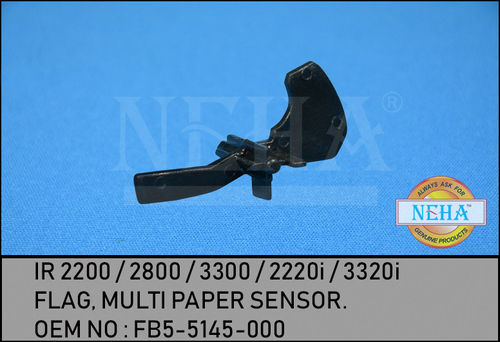

Price:
- 50
- 100
- 200
- 250
- 500
- 1000+

More Products in Photocopier Spare Part Category
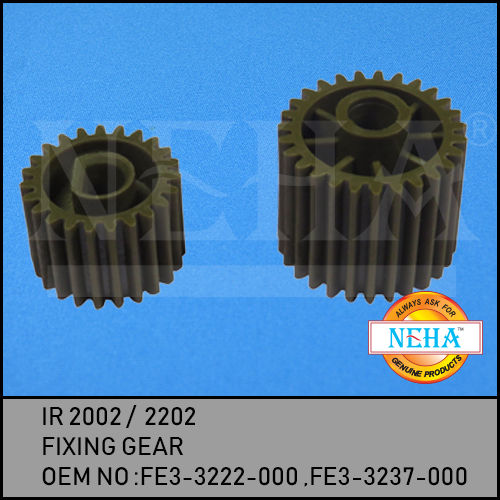
FIXING GEAR
Price 0.70 USD ($)
Minimum Order Quantity : 50 Pieces
Usage & Applications : Printer, Copier IR 2002/2202 Models
Color : Dark Grey/Black
Material : Highgrade Metal / Alloy Steel
Shape : Spur Gear (Cylindrical)
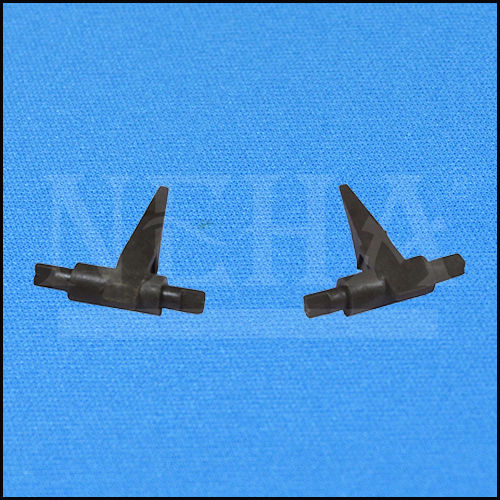
IR 1600 CLOW
Price 1.39 USD ($)
Minimum Order Quantity : 50 Pieces
Usage & Applications : Used in Industrial Machines Textile, Automotive, Engineering applications
Color : Black
Material : High Grade Alloy Steel
Shape : Angular with cylindrical base
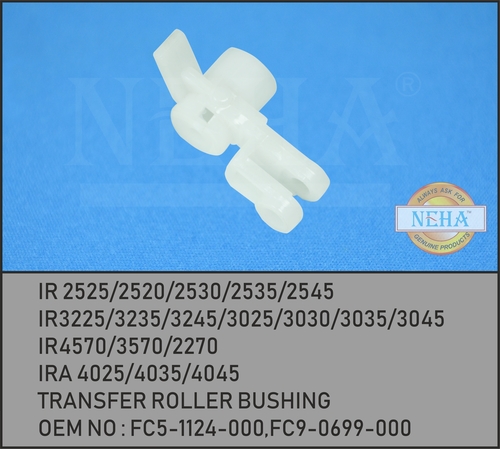
TRANSFER ROLLER BUSHING FC5-1124-000 FC9-0699-000
Price 0.70 USD ($) / Piece
Minimum Order Quantity : 100 Pieces
Usage & Applications : Transfer Roller Support/Guide for Canon Laser Printers
Color : Black
Material : Highgrade Plastic
Shape : Cylindrical Bushing
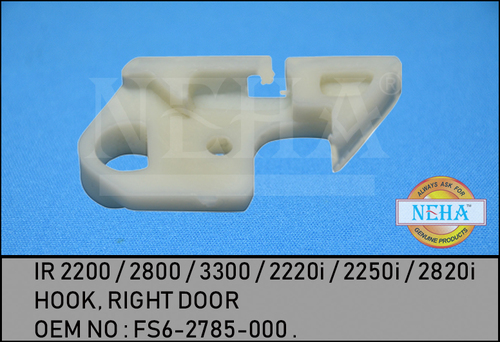
HOOK RIGHT DOOR
Price 0.21 USD ($)
Minimum Order Quantity : 50 Pieces
Usage & Applications : Right door hook for copiers/printers (e.g., IR 2200/2800/3300/2220i/2250i/2820i)
Color : White
Material : Plastic
Shape : OEM Specific/Custom

- Shop No: NG 41/1/1, 90 Feet Road, Opp. Kailash Tower, Ghatkopar (E), Mumbai - 400075, Maharashtra, India
- Phone : 08045803501
GST : 27AABPP0542K1ZR
- Mr. Anil Ravaria (Proprietor)
- Mobile : 08045803501
-
 Send Inquiry
 Send Inquiry
|

 Send Inquiry
 Send SMS
Developed and Managed by Infocom Network Private Limited.

